Sunday, April 12, 2015

Mandelbrot Set Rendering

Benoit Mandelbrot was a Polish-born mathematician. His most well known work is in the field of fractals. He came up with a function describing a set of complex numbers called the Mandelbrot Set.
The Mandlebrot set describes a set of numbers "c" such that the sequence (c1, c2 .... cx) where cn+1 = (cn*cn)+cn does not approach infinity.
So you're looking at c, c²+c, (c²+c)²+c, ((c²+c)²+c)²+c...

A complex number has two parts. It's a sum of real an imaginary components. Let's say we're looking at A + Bi.
A is the real component.
Bi is the imaginary component.
'i' is a symbol representing the √-1 (square root of -1)
i.e., (Bi)² would be -B².

Mandelbrot's equation for describing the model is z'=z²+c.
Let z be our A + Bi from above.
The next element of the sequence is 
If z=(A+Bi)² then z=A²-B²+2*A*Bi


If plotting, we can us X, Y in place of A, and B.
so, z=X²-Y²+2*X*Y(i)
We have real and imaginary components here.
So Xnew=X²-Y², and Ynew=2*X*Y
the "c" is the starting point for Mandelbrot's equation.
Z=Z²+c, so we need to add X0 and Y0 to the above:

Xnew=X²-Y²+X0
Ynew=2*X*Y+Y0
And from here, we keep iterating on this till we hit set limits to number of iterations, or if X/Y are sufficiently large.

So, for a point X, Y,
Repeat the following until x0²+y0²>4 or until set max iterations

Until (max iterations, or x0²+y0²>4)
  x0=0 and y0=0
  x1=x0*x0-y0*y0+X
  y1=2*x0*y0+Y
  x0=x1
  y0=y1
Color point X,Y based on iterations.


Point X,Y is then associated with the number of iterations to break out of that loop.

Using this we can construct a basic Mandelbrot generator. I did this using Javascript, since it's easy to use any browser to display a canvas element. This works in Firefox and Chrome (has worked for a while) and I've tested it in IE11 and it works there too.


<!DOCTYPE HTML>
<html>
<script language="javascript">
  function rgbToHex(r, g, b) { //thanks stackoverflow
    return "#" + ((1 << 24) + (r << 16) + (g << 8) + b).toString(16).slice(1);
  }
  function putpixel(x,y,r,g,b,ctx){
    ctx.fillStyle = rgbToHex(r,g,b);
    ctx.fillRect(x,y,1,1);
  }
  function paint(cnvname){
    mcanvas = document.getElementById(cnvname);
    ctx = mcanvas.getContext('2d');
    ctx.clearRect(0, 0, 799, 599);
    for (x = 0; x < 799; x++) {
      for (y = 0; y < 599; y++) {
        tx=(x-400)/(200); // tx is "translated x" for graph centering"
        ty=(300-y)/(200); // ty is "translated y" for graph centering"
        xtmp=0;
        ytmp=0;
        xtmp2=0;
        iter=0
        maxiter=1000;
        for (; (iter<maxiter) && (xtmp*xtmp+ytmp*ytmp < 4);) {
          xtmp2=xtmp*xtmp-ytmp*ytmp+tx;
          ytmp=2*xtmp*ytmp+ty;
          xtmp=xtmp2;
          iter++;
        }
        contrast=0.15
        color=Math.floor( (Math.pow(iter,contrast)*255)/Math.pow(maxiter,contrast));
        putpixel(x,y,0,255-color,255-color,ctx);
      }
    }
  }
</script>
<body onload='paint("mcanvas")'>
  <div>
    <canvas id="mcanvas" width="800" height="600"></canvas>
  </div>
</body>
</html>


This is a simple bit of javascript that iterates over the pixels of the canvas created in the body. It applies the function described earlier to determine the max number of iterations to the set.


Pretty right? Of course there's much more to mandelbrot than just the bulb.
We can zoom in on a portion of this by applying a zoom and x/y offset to the above code.

We can add a zoom and offset feature to explore the set.


  for (x = 0; x < 799; x++) {
    for (y = 0; y < 599; y++) {
      zoom=20; xoff=0.6; yoff=0.6;
      tx=-xoff+(x-400)/(zoom*200); // tx is "translated x" for graph centering"
      ty=yoff+(300-y)/(zoom*200); // ty is "translated y" for graph centering"

The above change will produce the following:

This is zoomed in 20x onto the small bulb in the top left portion of the largest bulb. Note the pattern replicates, and there are several tiny bulbs that look a lot like the main one (with slight variations).

Now the fun part - we can color based on x, y or iterations. Apply a sinusoidal function to iterations for red, blue and green, and you can have a never ending palette of color.

e.g.
From the contrast and color line:

//contrast=0.25
//color=Math.floor( (Math.pow(iter,contrast)*255)/Math.pow(maxiter,contrast));
cycle=(maxiter)/(3.14159265359*100);
cr=Math.floor(128+127*Math.sin(0.00+iter/(cycle*1.5000)));
cg=Math.floor(128+127*Math.sin(1.57+iter/(cycle*1.6000)));
cb=Math.floor(128+127*Math.sin(3.14+iter/(cycle*1.5666)));
putpixel(x,y,cr,cg,cb,ctx);

So, what are we saying? A cycle is 2*pi. We're dividing the iterations by 100*pi, so we're looking at at 50 cycles. Red, green and blue values are sinusoidal cycles with different start points - red starts at 128+127*sin(0) (so 128, and increasing). Green is 128+127*sin(1.57) (so 255, 1.57 being half pi, sin(pi/2) is 1) - i.e. max green and heading down to 0. Blue is starting at 128+sin(pi), which means middle intensity and getting darker.
Each sinusoidal cycle has it's own multiplier so each cycle has it's own rate, giving many more colors ans each cycle creates a new palette.

Here's the result:


We're looking at integers since we're only counting max iterations. We can smoothen this by looking at how far past our boundary condition each iteration went.

My script was based on methods described in wikipedia.


log2=Math.log(2)
if (iter<maxiter){ //smoother transitions
  zn=Math.sqrt(xtmp*xtmp+ytmp*ytmp);
  zl=Math.log(Math.log(zn)/log2)/log2;
  iter+=1-zl;
} 


Now consider the interior of the bulb. It's what happens when the iterations have been maxed. We can color the interior by using the same palette. I haven't quite figured out the how to map distance, but we can use the existing xtmp and ytmp variables. Since iterating more doesn't get us greater than the boundary condition, we can assume xtmp and ytmp are small. 

What I tried was several permutations of setting iter to 1/xtmp and 1/ytmp. I settled on using iter=Math.log( (1/(xtmp*xtmp+ytmp*ytmp)) )/(log2);
The idea is that if my values aren't going to break out of the boundary, then they're converging. So I'm using the inverse of the values to dictate what they will be against the existing palette. Not all sub-bulbs show this though.


Here's the overall code for this basic mandelbrot renderer...


<!DOCTYPE HTML>
<html>
<script language="javascript">
  function rgbToHex(r, g, b) { //thanks stackoverflow
    return "#" + ((1 << 24) + (r << 16) + (g << 8) + b).toString(16).slice(1);
  }
  function putpixel(x,y,r,g,b,ctx){
    ctx.fillStyle = rgbToHex(r,g,b);
    ctx.fillRect(x,y,1,1);
  }
  function paint(cnvname){
    mcanvas = document.getElementById(cnvname);
    ctx = mcanvas.getContext('2d');
    ctx.clearRect(0, 0, 799, 599);
    log2=Math.log(2)
    for (x = 0; x < 799; x++) {
      for (y = 0; y < 599; y++) {
        zoom=20; xoff=0.6; yoff=0.6;
        tx=-xoff+(x-400)/(zoom*200); // tx is "translated x" for graph centering"
        ty=yoff+(300-y)/(zoom*200); // ty is "translated y" for graph centering"
        xtmp=0;
        ytmp=0;
        xtmp2=0;
        iter=0
        maxiter=1000; // increase with larger zoom values
        totes=0;
        for (; (iter<maxiter) && (xtmp*xtmp+ytmp*ytmp < 4);) {
          xtmp2=xtmp*xtmp-ytmp*ytmp+tx;
          ytmp=2*xtmp*ytmp+ty;
          xtmp=xtmp2;
          iter++;
        }
        if (iter<maxiter){ //smoother transitions
          zn=Math.sqrt(xtmp*xtmp+ytmp*ytmp);
          zl=Math.log(Math.log(zn)/log2)/log2;
          iter+=1-zl;
        } else { // for internal color of Mandelbulb
          iter=Math.log( (1/(xtmp*xtmp+ytmp*ytmp)) )/(log2);
        }
        cycle=(maxiter)/(3.14159265359*100); //50 cycles from 0-maxiter
        cr=Math.floor(128+127*Math.sin(0.00+iter/(cycle*1.5000)));
        cg=Math.floor(128+127*Math.sin(1.57+iter/(cycle*1.6000)));
        cb=Math.floor(128+127*Math.sin(3.14+iter/(cycle*1.5666)));
        putpixel(x,y,cr,cg,cb,ctx);
      }
    }
  }
</script>
<body onload='paint("mcanvas")'>
  <div>
    <canvas id="mcanvas" width="800" height="600"></canvas>
  </div>
</body>
</html>


Manipulation of the color palette constants, zoom, offsets, and even the equation can produce some beautiul results.

For example,
Set the initial xtmp to tx and ytmp to ty.

change:
xtmp2=xtmp*xtmp-ytmp*ytmp+tx;
ytmp=2*xtmp*ytmp+ty;


to:
xtmp2=xtmp*xtmp-ytmp*ytmp-0.32;
ytmp=2*xtmp*ytmp+0.6575;


Now you're making a Julia plot.
This is another fractal you can zoom in continuously.

Let's look at zooming in on a portion of the Mandelbrot set.
zoom=1.00; xoff=0; yoff=0;


zoom=5; xoff=0.7348; yoff=0.1798;

zoom=25; xoff=0.8; yoff=0.2;


zoom=125; xoff=0.79; yoff=0.158;


zoom=625; xoff=0.79; yoff=0.162;

zoom=3125; xoff=0.7893; yoff=0.163;


At this point we need to increase the maxiter constant. I raised this to 10000.
zoom=9125; xoff=0.78937; yoff=0.16307;


 zoom=15625; xoff=0.78940; yoff=0.163055;


zoom=78225; xoff=0.78940; yoff=0.163055;
Note the zoom - we're at almost 80000x and as you can see there's a lot more structures here!

Tuesday, March 3, 2015

Regulating a mechanical watch cheaply

Regulate a watch cost = computer (you probably have one) + headphones with mic ($15?) + audacity (free)...


Mechanical watches are freaking cool. It's an awesome display of mechanical precision - granted, one that's been around for a while.

A nicely finished mechanical is truly something to behold. A window to the innards can show off the splendor of it's beating heart. The sound of the escapement, smoother movement of the hands compared to a quartz which jumps every second. Just consider how precise these parts have to be to ensure not only accuracy, but so that it doesn't stick, or vary with winding.


Of course, quartz watches are far more functional for the price. They can add functionality much more easily. A change to the programming and a button can switch modes from telling time, to showing an alarm time, to various time zones, a stop watch, and timer - all requiring mainly some code changes. Each hand of a quartz watch can be controlled separately instead of geared together simplifying everything.


Love the details and precision machining of a mechanical. 

It's this precise beauty that generally attracts me to mechanical watches more. The problem is that as a time keeping instrument, even excellent expensive mechanical watches are no match for a lowly cheap quartz. The mechanical's spring varies force as it unwinds, which varies the speed at which it would spin the hands if not for the escapement. The escapement is there to regulate that unwinding. It does so by iterating through halting the movement and then quickly letting it tick - so the time it's halted for + time of a tick is kept close to constant throughout the unwinding.


Of course it's not perfect. Even simple things like orientation - how the watch is lying (face up, on the side etc.) - can affect the timing rate. 


This is a watch I put together. The face, hands and movement from from a Vostok Komandirskie. The case was for an Amphibian. The bezel was aftermarket from another ebay vendor. The Crown was from a much older Amphibian I bought for parts. Something else I got myself into.

I was able to get this watch to ~5 seconds slow per day. Initially it was probably 30 seconds off. Over a week, you're a few minutes early or late. That was too much for me, but common for mechanical watches.

Here's how I regulated my watch. Start by getting the back off. My back is a screw type, so I use the brass wrench tool pictured here to do that.


Let's zoom in and look at the mechanism again. That balance wheel controls how fast or slow the watch is. The slim liver extending down from the balance wheel bearing is the lever to manipulate when regulating the watch. Push the bottom of the lever to the right to slow down, left to speed up (you know directions based on the - and + signs above it).


To "measure" the current timing, I used a simple microphone from a cheap headset. This is flat and rests on the bridge of the mechanism without getting in the movement. You're going to want a quiet room to do this in! (Note to self, test a piezo mic!). I put a container over this and threw my sweater on top to dampen any extra sound (cheap soundproofing!).


Here's the setup - My laptop is running Audacity to record the sound from the mic. 


Here's what the first recording looks like. Select the waveform from the start of the recording to the very first peak. That peak is the tick/tock of the escapement.


My watch ticks at 5.5 per second. So every even second should line up with a peak. Now, skip forward 10 seconds, ensure it lines up. another 10 etc. Here's a minute - and it's looking pretty good. If the peak is happening early, then the watch is fast. If it's late, the watch is slow. The regulating lever needs to be moved ever so slightly to get this accurate. We're talking a hair's breadth here...  


Use the zoom tool as you get closer to your goal. From this shot you can see that i'm recording for at least 2 minutes. Audacity can measure the length of the waveform selected (middle numbers at the bottom). After 2 minutes, my watch is 7ms off. That's .21 seconds per hour. 5.04 seconds per day. So far usage has help up that figure.


Something else to note - depending on the orientation of the watch, the movement can run faster or slower. Generally I don't have much variation with this model. This is a hand-wind movement, so going a little slow is beneficial to me. If I wind it tight and hold it I can make up a few seconds.

Something to note is we are quite dependent on the accuracy of the computer's clock when doing this. Strongly advise that any time keeping applications/services like NTP are disabled during this (if you don't know, don't bother, you probably don't have it). The quartz clock of a PC will be easily accurate enough for this level of accuracy.

So there you have it. Cheap means for regulating a watch. Give it a try :)

Thursday, February 19, 2015

Fix a loose lens adapter

Adapting a lens to another camera system generally involves using an adapter of some sort. most of the time, I buy cheap adapters off amazon because for the most part, they do fairly well.

However, I often end up with adapters that are a little loose. This is bad for a couple reasons. The first issue is the adapter if too loose may jiggle a little making focusing manually a bit more difficult, and inaccurate. The second issue is if the lens isn't held in place properly, it can end up at an angle to the sensor, preventing optimal sharpness in the plane you expect.

Lets take a look at a cheap adapter for Nikon G to Canon EF mount.


The adapter is from "Fotasy" which is a cheap chinese company that may simply resell adapters from another company. Here the adapter is attached to the lens first to "convert" the mount of the lens to EF. The fotasy lens adapter is pretty slack. I get better fittings from other brands "fotodiox" for example.


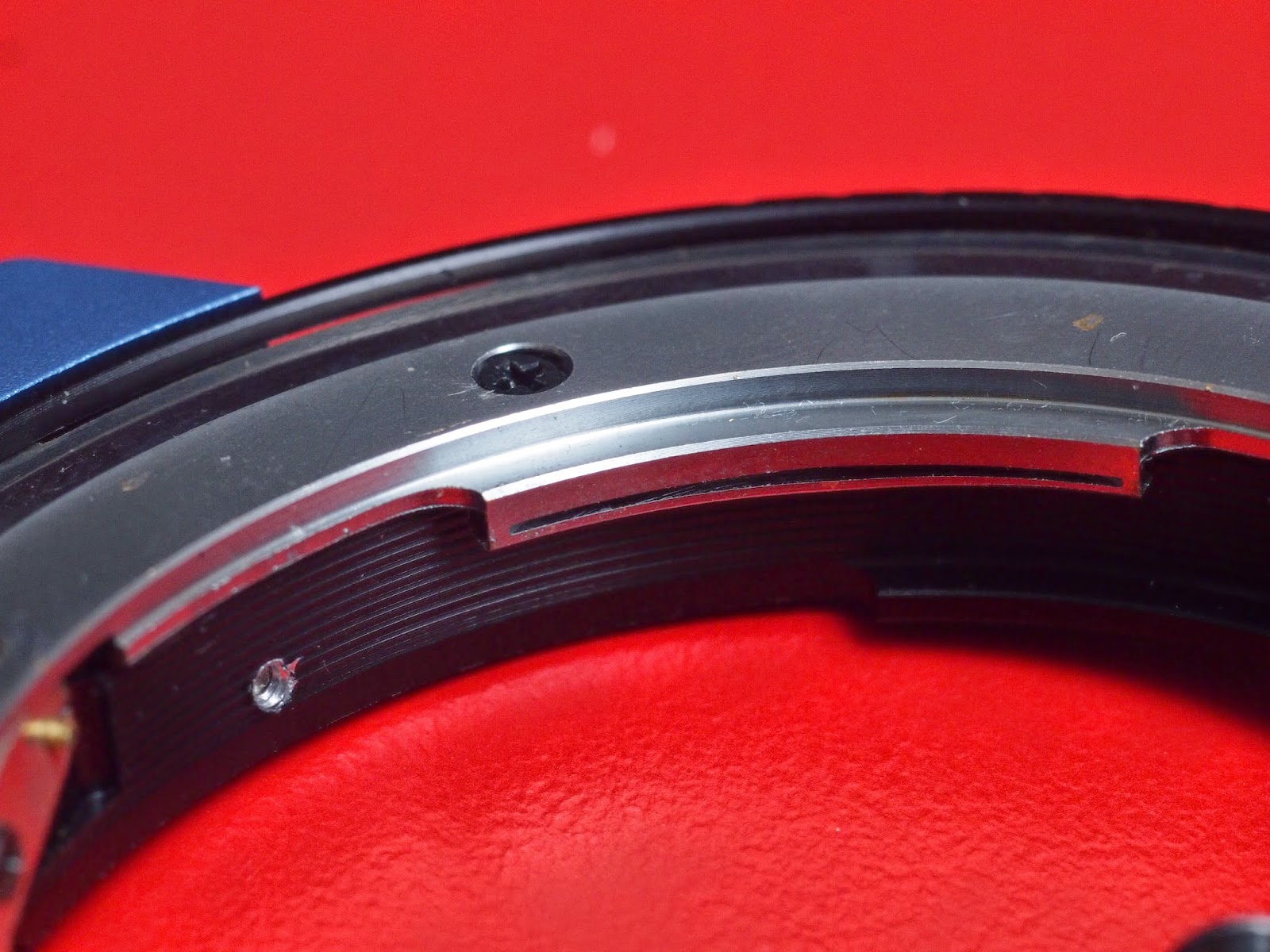
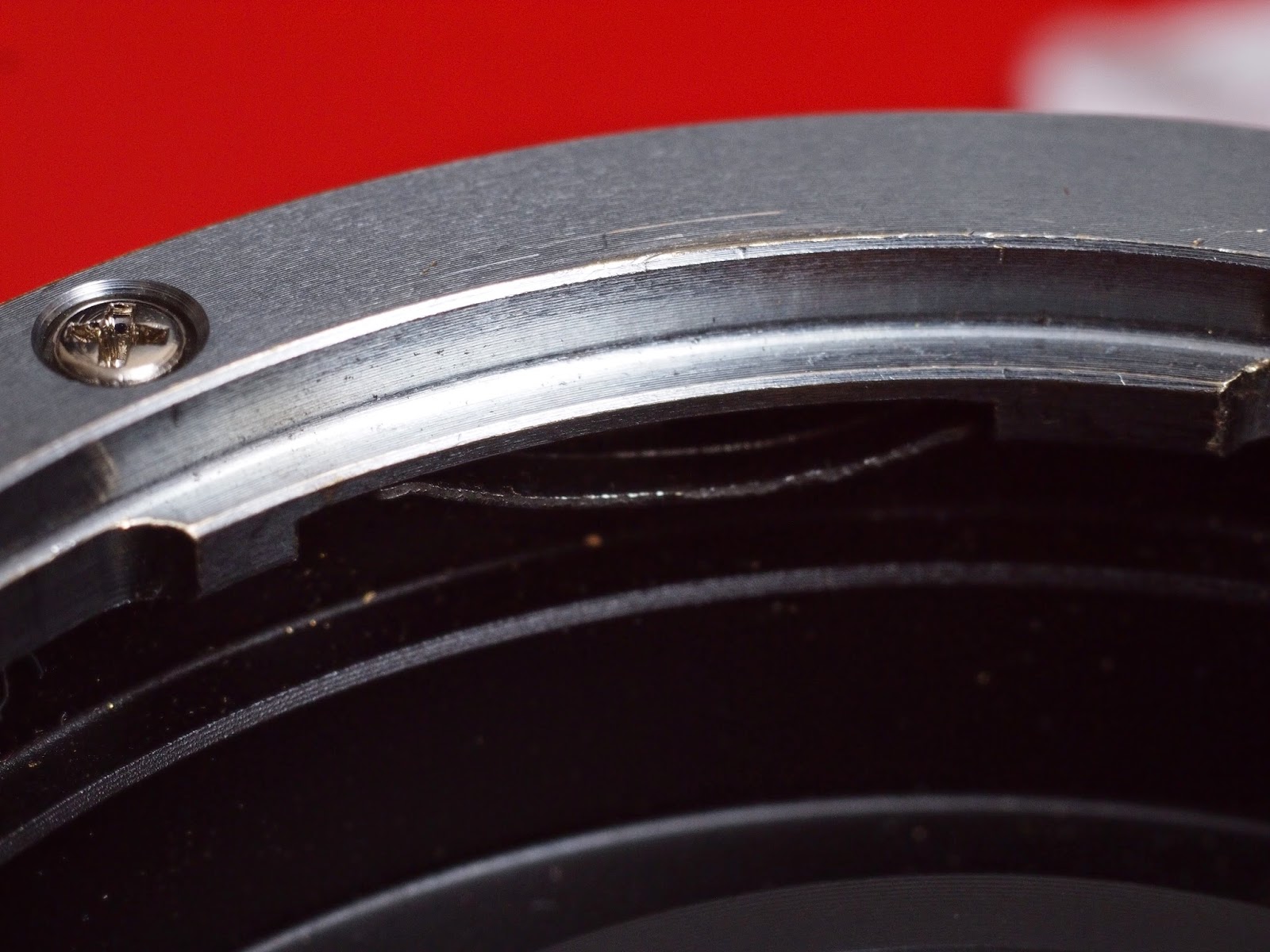
The inner lugs of the adapter that grip the lens has a slit. Take a good look at the space here. This is a closeup of the adapter's lug.
This is meant to act as a "spring" to apply pressure to the camera's mount. This "fotasy" adapter has extremely weak "springs".


My goal is to increase the force of these springs to have a tighter fitting adapter. I use a screw driver and firmly push it in the space. Do it slowly to gently make the gap wider and increase the effect of the spring. 


Wiggle the screwdriver into the slit, expanding it slowly.


Don't make it too large. A little will help a lot.


On the Fotasy, this is a rather weak spring, and it helps a little. Stacking strips of tape or paper, inserting it and trimming it with an Xacto or razor works great to cushion the spring a bit. I used a post-it note to "fix", folding it a few times and squeezing it in, and cutting off the rest.

Here's what a pricier adapter looks like:
The spring of a pricier option - this is a Canon EF-MFT adapter, so in addition to costing more, there's also more room for better springs.


Once back on, the adapter holds firmer, having little or no play. Now go out and shoot!

Sunday, February 8, 2015

C-Mount lenses on MFT (micro four thirds)

Micro Four Thirds was unique among interchangeable lens cameras when it was introduced. It was smaller than DSLRs, yet had a decent sized sensor - the same size as Olympus and Panasonic DSLRs at the time. Almost 70% the area of a Canon APS-C sensor it was capable of delivering very decent quality. What made it really unique was the very short "flange distance" made possible by not using a mirror as is "normal" in an SLR.

The flange distance is the distance from the sensor to the lens mount surface of the camera. Nikon F-Mount DSLRs for example have a flange distance of 46.5mm. Lenses where the rear element gets beyond this point risk being smashed by the mirror when taking a picture. Remember in a DSLR, that mirror is directing light upwards to the viewfinder, and when you press the shutter, it will swing upwards.

Micro Four Thirds uses a 19.25mm flange distance. This means that if A Nikon F-mount lens were held 27.25mm away from the Micro Four Thirds camera's mount over the sensor, it would be able to focus properly on the sensor, since it's the same distance it would be in a regular Nikon F-Mount camera.

In a case like this, adapters are made to let users mount the lens onto their Micro Four thirds cameras. Normally they are manual only, as no electric signals will get from the lens to the camera. This is fine though, as old lenses usually have the wonderful feature of an aperture ring. It's just like aperture priority in regular use, except now your aperture control is a direct mechanical link. Sounds better actually :)


C-Mount lenses refer to a range of lenses used on CCTV security cameras, 16mm movie cameras, machine vision and robotic applications etc. The problem with assessing one of these to determine if it will work on a MFT camera properly is the image circle of C-Mount is not standard. The Sensor for These can range from 8mm (also listed as 1/3") to 25mm (1"). A 1" format lens is generally more expensive, but is more likely to cover the MFT sensor. Some 2/3" format lenses can work, but generally result in vignetting, and poor quality edge/corner images.


C-Mounts are fun because they're generally tiny. After all - if you have a 25mm adapted DSLR lens, it's fairly hefty on a small MFT camera. Drop in a C-mount 25mm F1.4 and it's still tiny! Go cheap of course, and the quality wont match the DSLR lens. Indeed, most C-Mount lenses result in a picture far from perfect - however, they are cheap, fast can be capable of good center clarity, and can give off a unique swirling bokeh that when utilized is hard to match.


The Lenses:


A smattering of c-mount lenses. Clockwise from top left: General Electric 25mm F1.4, Canon PHF 35mm F1.2, Cosmicar 75mm F1.4, Wollensak 25mm F1.5, Pentax 25mm F1.4.


One of my favorites. A Wollensak 25mm F1.5. Before fast lenses were common on Micro Four Thirds, these small 25mm lenses were quite popular. This originally was meant for old film video cameras. Some vignetting, but recoverable. Lovely render!


This lens looks rather interesting, but vignettes too much at the corners. A General Electric 25mm F1.4 TV lens. Much cheaper than the Wollensak, and the image quality showed it too.


Pentax 25mm F1.4. If one were looking for better quality than the cheap c-mounts from china, this was the one to get. For about $100, this gave a more neutral picture compared to the Wollensak. Other than the extreme corners, there is less vignetting, color was more neutral, though it wasn't quite as sharp. Still a decent lens, and extremely smooth focus action.


The Cosmicar 75mm F1.4. Cosmicar was a Pentax division. I'm not sure if it was a purchase by Pentax, or if it originated from them, but Pentax is now Ricoh. Pentax was merged into Hoya and Ricoh purchased the imaging division.


Another angle showing the nice large front element. While it's large, it's not bad to handle.


This is the Canon PHF 35mm F1.2. It required heavy modding to fit on here. When I work this hard on something I generally like it more than I should. That said, I can't help but love how sharp this lens gets in the center. Face shots of my daughter are wonderful with this, and the focus plane curves forwards towards the edges - this curve makes facial features go out of focus FAST - not optimal, but it if you're wanting to blur, this will satisfy.


The adapter itself is little more than a MFT mount, on a flat washer like bit of metal, with a threaded inset. There are several makes and models available. If you're after a nice thin one to maximize adapting lenses, consider the pictures below.


Sample images:

Christmas tree light bokeh! This was shot with the canon PHF 35mm at F1.2. note the shape of the bokeh circles as the lights are positioned towards the edges and corners of the frame.


Here's a few samples from the above lenses:


The 75mm F1.4 Cosmicar delivers enough coverage and sharpness to pass mustard. While it starts off bright and decent enough at that aperture, stopping down doesn't aid it that much. That said, the bokeh is superb giving a smooth render.


The 25mm F1.5 Wollensak shows a heavier vignette that one would be used to  with standard commercial lenses. It's decently sharp in the center and resists veiling and ghosting enough to be used as an everyday lens. Size as pictured above also helps that designation. Being easy to carry has it's perks! If the best camera is the one you have with you, then being able the carry a good camera means a lot too.


Shot with the Canon PHF 35mm at F1.2 You can see the difference compared to the above Wollensak. The bokeh certainly stands out more - though in comparison to the 75mm, it's not quite as smooth. Note also the curvature of the keyboard, and the heavy vignette. This lens is extraordinarily sharp in the center wide open, yet fails miserably in the corners. This actually makes the lens quite capable of adding focus to a picture. Viewers eyes will be attracted to the sharp center. This can add an artistic element to face shots, and the curvature and character of the render does nicely with lights in dark shots.


The best place to get C-mount lenses imo is ebay.com. While the Pentax 25mm F1.4 was sold up until recently, it was discontinued. Lenses like the Wollensak have shot up in price to astounding levels due to their rarity. I think most legacy lenses would only have their value rise over time as better mirrorless cameras with better manual focus functions (like focus peaking) become available.


For more information on c-mount (cine) lenses, there is the cine-lenses sub-forum at mflenses.com with numerous threads of information and the c-mount on M4/3 group on facebook is quite lively.